How to Choose the Best AI Answering Service in 2026 (Buyer's Guide)
Choosing an AI answering service shouldn't feel like decoding a contract. You just need calls answered, appointments booked, and leads captured before they call your competitor.
The problem is that every provider claims to do this perfectly, and their pricing pages read like tax documents. Some charge per minute, others per call, some have hidden setup fees, and the feature lists are identical until you actually need something to work.
After comparing dozens of AI answering services and analyzing pricing across different call volumes, here's what you actually need to know before signing up.
What Is an AI Answering Service?
An AI answering service uses voice AI to handle your business phone calls automatically. When someone calls, the AI picks up, understands what they need, provides answers, books appointments, takes messages, or routes urgent calls to you.
The difference from old phone trees is that people can speak naturally instead of pressing buttons. The AI understands "I need to reschedule my Tuesday appointment" and handles it, rather than making the caller navigate four menu levels.
Modern AI answering services integrate with your calendar and CRM, so when someone books an appointment, it goes straight into your schedule. When someone calls asking about pricing, the AI quotes your actual rates. When there's a genuine emergency, it recognizes urgency and forwards the call immediately.
AI Answering Service vs Traditional Answering Service vs Virtual Receptionist
People use these terms interchangeably, but the cost difference is massive.
Traditional answering service:
-
Real people answer calls and take messages
-
Typical cost: $0.80 to $1.50 per minute
-
Monthly base fee: $100 to $200
-
Total monthly cost for 100 calls averaging 3 minutes each: $240 to $450
-
Can't handle multiple calls at once
-
Charges extra for nights, weekends, holidays
Virtual receptionist:
-
One dedicated person or rotating team handles your calls
-
Typical cost: $500 to $2,000+ per month for part time coverage
-
Limited hours unless you pay significantly more
-
Human judgment for complex situations
-
Can personalize interactions but limited to one call at a time
AI answering service:
-
Software handles unlimited simultaneous calls
-
Typical cost: $30 to $99 per month flat rate
-
No per minute or per call charges
-
Same price nights, weekends, holidays
-
Can book appointments directly into your calendar
-
Total monthly cost for 100 or 500 calls: still $30 to $99

The key trade off: AI costs 75 to 90% less than human services, handles unlimited volume, and works all day every day. Human services provide empathy and judgment for complex emotional situations.
For most small businesses, AI handles 70 to 80% of calls perfectly. The 20% that need human touch can still be routed to you directly.
How Much Does an AI Answering Service Actually Cost?
AI answering services use three main pricing models. Understanding which one fits your call pattern saves you from overpaying.
Pricing Model 1: Flat Monthly Rate (Most Common)
You pay one price per month regardless of call volume.
How it works:
-
$30 to $99 per month for unlimited calls
-
No per minute charges
-
No overage fees
-
Same price whether you get 10 calls or 1,000 calls
Best for:
-
Businesses with unpredictable call volume
-
Service businesses with seasonal spikes (HVAC, landscaping, tax prep)
-
Any business taking more than 50 calls monthly
-
Companies testing AI answering for the first time
Example: Voicei charges $49/month flat. If you take 50 calls in January and 300 calls in July, you pay $49 both months.
Watch out for: Some "flat rate" plans cap simultaneous calls or total minutes. Verify it's truly unlimited.
Pricing Model 2: Per Call Billing
You pay a set amount for each call answered, regardless of length.
How it works:
-
$2 to $8 per call
-
Call length doesn't matter
-
Some services exclude spam or calls under 15 seconds
Best for:
-
Very low call volume (under 20 calls monthly)
-
Businesses where call length varies wildly
-
Testing before committing to monthly plans
Example: 30 calls at $3 each = $90 monthly. Works if your calls average 8+ minutes but you only get a few.
Watch out for: This gets expensive fast above 50 calls per month. Do the math against flat rate.
Pricing Model 3: Per Minute Billing
You pay for every minute the AI spends on calls.
How it works:
-
$0.10 to $0.35 per minute for AI only services
-
Often includes monthly platform fee of $20 to $50
-
Some have minute bundles with overages
Best for:
-
Extremely low volume (under 30 minutes monthly total talk time)
-
Very short calls (under 1 minute average)
-
Supplementing existing receptionist during lunch/breaks only
Example: 100 calls at 2 minutes each = 200 minutes. At $0.20/minute + $30 platform fee = $70 monthly.
Watch out for: Hard to predict monthly cost. One chatty customer throws off your budget.
Hidden Costs to Ask About
Before signing up, confirm:
-
Setup fees: $0 to $300 one time charge
-
Number porting fee: $5 to $25 if moving your existing number
-
Training/configuration: Some charge $50 to $200 to set up your account
-
Integration fees: Connecting to your CRM or calendar might cost extra
-
Recording storage: Older call recordings might have storage fees
-
Emergency routing: Some charge extra to forward urgent calls
-
Languages: Spanish support might be an add on at $10 to $30/month
-
Contract length: Month to month or annual commitment?
Voicei includes setup, training, integrations, emergency routing, and unlimited storage at $49/month with no contract.
Must Have Features vs Nice to Have Features
Not every AI answering service does the same thing. Here's what actually matters.
Must Have Features (Non Negotiable)
1. Natural conversation ability The AI should handle normal speech, including pauses, interruptions, and people who ramble. If it can only respond to exact phrasing, callers will get frustrated.
Test this: Call the demo number and try asking the same question three different ways. All three should work.
2. Calendar integration and appointment booking If your business books appointments, the AI needs to check your calendar in real time and book directly. Anything less means you're still manually scheduling from messages.
Look for: Two way sync with Google Calendar, Calendly, or your scheduling tool. The AI should see your availability and write appointments back to your calendar immediately.
3. Emergency call routing The AI must recognize urgent situations and forward calls to you. A plumber needs burst pipe calls routed immediately, not added to a message queue.
Ask: Can the AI detect keywords like "emergency," "urgent," "flooding," "no power"? How does routing work after hours?
4. Call transcripts and recordings You need to review what the AI is telling people. Transcripts let you verify accuracy and train the AI on new scenarios.
Minimum: Text transcript of every call. Better: Audio recording + transcript. Best: Searchable transcripts with caller sentiment analysis.
5. Customizable knowledge base The AI should know your business specifics: services, pricing, hours, service areas, policies.
Test this: Can you update pricing or hours yourself, or do you need to contact support? How long until changes go live?
Nice to Have Features (Add Value But Not Critical)
Multi language support Useful if you serve Spanish speaking customers or other language groups. Verify which languages are included vs add ons.
CRM integration Syncs call data, contact info, and appointments to HubSpot, Salesforce, or your CRM. Saves manual data entry but you can also do this through Zapier.
SMS confirmations Automatically texts appointment confirmations and reminders. Reduces no shows but you might already have this through your scheduling tool.
Sentiment analysis Tells you if callers were happy, frustrated, or confused. Interesting data but doesn't change outcomes much.
Call analytics dashboard Shows call volume by hour, day, week. Helps optimize staffing but most small businesses don't need this level of detail.
Payment collection Some AI services can collect credit cards or deposits over the phone. Only matters if you charge deposits for appointments.
Features That Sound Good But Rarely Matter
50+ voice options Who cares if you have 50 voices when you'll pick one and never change it? One or two natural sounding voices is enough.
White labeling Only useful if you're an agency reselling the service. Your customers don't care about the underlying platform name.
API access Unless you're building custom integrations, you won't use this. The native integrations cover 95% of use cases.
How to Evaluate AI Answering Services: 7 Question Framework
Use this checklist when comparing options.
Question 1: Does the pricing make sense for my call volume?
Calculate your monthly cost at different volumes:
-
What if I get 50 calls per month?
-
What if I get 200 calls per month?
-
What if I have a busy month with 500 calls?
If the answer to question 3 is "I have no idea, depends on call length and overages," that's a red flag. Unpredictable pricing makes budgeting impossible.
Flat rate pricing almost always wins above 50 calls per month.
Question 2: Can I test it with real calls before committing?
Never buy an AI answering service without testing it yourself.
Minimum acceptable trial: Forward your business number to the AI and let it handle real calls for 3 to 7 days.
Red flags:
-
No trial period at all
-
Trial requires credit card with automatic billing
-
Demo only mode that doesn't handle real calls
-
"Call our sales team to discuss a trial"
Green flags:
-
Free 7 to 14 day trial
-
No credit card required to start
-
Full feature access during trial
-
Easy cancellation if it doesn't work
Question 3: How fast is setup, really?
"Setup in 5 minutes" usually means basic configuration only. Full setup including knowledge base training, calendar sync, and testing takes 30 to 60 minutes minimum.
Ask:
-
Do I do setup myself or does your team do it?
-
What information do you need from me?
-
How long until the AI is answering calls correctly?
-
Can I update settings myself or do I contact support?
Self service setup is better than "our team handles it." You want control over your own system.
Question 4: What happens when the AI doesn't know the answer?
Every AI will eventually face a question it can't answer. The fallback behavior matters.
Good fallback: Takes a detailed message, flags it as urgent, notifies you immediately, and optionally offers to transfer to you.
Bad fallback: Says "I don't know" and hangs up. Or worse, guesses incorrectly.
Ask: "What does your AI do when it doesn't know how to answer something?"
Question 5: How do I train the AI on new scenarios?
Your business changes. Pricing updates, new services launch, policies change, hours shift for holidays.
Ask:
-
Can I update the knowledge base myself?
-
How long does it take for changes to go live?
-
Can I review transcripts and mark wrong answers for correction?
-
Do you offer ongoing optimization or is it set and forget?
Self service knowledge base updates are essential. If you have to email support every time you need a change, you'll stop making updates.
Question 6: Can it actually book appointments or just take messages?
This is the difference between an answering service and a receptionist.
Message taking: AI answers the call, collects name and phone number, notes that they want to book Thursday at 2pm, sends you the info. You manually add it to your calendar and call them back to confirm.
Appointment booking: AI answers the call, checks your calendar, confirms Thursday at 2pm is available, books it directly, sends the caller a confirmation text, and it's done.
You want the second one. Verify the AI can actually write to your calendar, not just read from it.
Question 7: What does customer support look like?
When something breaks at 4pm on Friday and you have calls coming in, can you get help?
Ask:
-
What are your support hours?
-
How do I contact support (email only, phone, live chat)?
-
What's typical response time for urgent issues?
-
Is there a setup call or training included?
-
Do you have documentation and video tutorials?
Small companies with great support often beat big companies with terrible support. Read reviews specifically about their support team.
Common Mistakes When Choosing an AI Answering Service
Mistake 1: Choosing Based on Price Alone
The cheapest option costs you more if it misses half your calls or gives wrong information to customers.
Better approach: Calculate cost per successfully handled call, not just cost per month.
A $30/month service that handles 60% of calls correctly versus a $49/month service that handles 95% of calls correctly is actually more expensive when you factor in lost leads.
Mistake 2: Not Testing with Real Calls
Watching a demo video is not testing. The AI might sound great on scripted examples and terrible with real customers who speak unclearly, interrupt, or ask unexpected questions.
Always run a trial with your actual business number forwarded to the AI. Make test calls yourself from different numbers. Have friends call and try to book appointments.
Review every transcript during the trial period.
Mistake 3: Picking the Service with the Most Features
More features doesn't mean better for your specific needs. An AI answering service with 47 features you'll never use is worse than one with 8 features you use daily.
Start with your must have list. Any service that checks those boxes will work. Extra features are only valuable if you'll actually use them.
Mistake 4: Not Checking Integration Compatibility First
If you live in Google Calendar and the AI only integrates with Calendly, you have a problem. If your CRM is HubSpot and they only connect to Salesforce, you'll be doing manual data entry.
Before evaluating anything else, verify the AI connects to the tools you already use. Native integrations are better than Zapier because they're faster and more reliable.
Mistake 5: Ignoring Voice Quality and Conversation Flow
Some AI voices sound robotic. Some are too slow. Some can't handle interruptions or background noise.
This matters because 30% of first time callers will hang up if the AI sounds too artificial. They assume it can't help them and call someone else.
Call the demo line multiple times. Talk over the AI mid sentence. Ask the same question different ways. Throw in background noise. See if it still works.
Mistake 6: Forgetting About After Hours and Weekend Coverage
You might be thinking about replacing daytime voicemail, but 40 to 50% of calls come after hours. That's when AI answering really pays off.
Verify the AI works identically at 2pm Tuesday and 2am Sunday. Some services charge extra for nights and weekends or have limited functionality outside business hours.
Mistake 7: No Clear Success Metrics
If you don't define what success looks like before starting, you can't tell if it's working.
Set these benchmarks before your trial:
-
How many calls do we miss now? (Check Google Business or phone logs)
-
What percentage should the AI handle without escalation? (Target: 70 to 80%)
-
How many appointments should it book weekly? (Based on current volume)
-
What's our goal for response time? (Target: under 10 seconds to answer)
Track these during the trial. If numbers improve, keep it. If they don't, try a different service.
Best AI Answering Services for Different Business Types
The right choice depends on what kind of business you run.
Best for Home Services (Plumbing, HVAC, Electrical, Landscaping)
What you need:
-
Emergency call detection and routing
-
Appointment booking with calendar sync
-
Service area verification
-
After hours coverage (most emergency calls come evenings and weekends)
-
Pricing quotes for standard services
Why: Emergency calls need immediate routing to the technician on call. Routine maintenance calls should book automatically. The AI should know your service area and pricing.
Voicei handles this: Emergency keyword detection routes urgent calls immediately. Calendar integration books maintenance appointments. You define service areas and pricing, and the AI quotes accurately.
Best for Salons, Spas, and Beauty Services
What you need:
-
Appointment booking, rescheduling, and cancellations
-
Service menu with pricing and duration
-
Stylist or technician preferences
-
Confirmation and reminder texts to reduce no shows
-
Package and membership information
Why: 60 to 70% of calls are appointment related. The AI should handle all of this automatically so stylists can focus on clients.
Voicei handles this: Books appointments directly into your calendar, handles reschedules, quotes service pricing, sends SMS confirmations, and knows which services each team member provides.
Best for Real Estate and Property Management
What you need:
-
Tenant maintenance request intake
-
Showing appointment scheduling
-
Property information (available units, pricing, square footage, amenities)
-
Qualifying leads (budget, move in date, requirements)
-
After hours coverage for emergencies
Why: Maintenance requests come 24/7. Prospective tenants call evenings and weekends. The AI should collect detailed information so you're not playing phone tag.
Voicei handles this: Takes detailed maintenance requests with urgency level, books property showings, qualifies rental leads, provides property details, routes genuine emergencies after hours.
Best for Professional Services (Law, Accounting, Consulting)
What you need:
-
Initial consultation scheduling
-
Conflict checking before booking
-
Detailed intake forms
-
Confidential message handling
-
Professional, polished voice
Why: First impressions matter. The AI represents your firm. It needs to sound professional, collect detailed case information, and respect confidentiality.
Voicei handles this: Professional voice options, detailed message collection, secure call handling, consultation booking with buffer times, practice area routing if you have multiple specialties.
Best for Medical and Dental Practices
What you need:
-
HIPAA compliance for call recordings and data
-
Appointment booking with insurance verification
-
New patient vs existing patient routing
-
Prescription refill requests
-
After hours nurse line or on call doctor routing
Why: Healthcare has strict privacy requirements. The AI needs HIPAA compliant infrastructure and smart routing for medical vs administrative calls.
Note: Most AI answering services including Voicei handle administrative calls (scheduling, billing, directions) but not clinical advice or diagnosis. Medical advice requires human providers.
Best for E-commerce and Online Stores
What you need:
-
Order status lookups
-
Return and exchange processing
-
Product information and recommendations
-
Shipping information
-
Shopping cart abandonment follow up
Why: E-commerce calls are often order related. The AI should integrate with your store platform to provide real time order information.
Note: This requires deep e-commerce integration. General AI answering services like Voicei work better for service businesses than online retail. Specialized e-commerce phone support platforms might be better for stores.
Red Flags to Avoid
Walk away if you see these warning signs:
Long term contracts required: Month to month is standard in 2026. Annual commitments should come with significant discounts, not be mandatory.
No trial or demo: If they won't let you test it, they know it doesn't work well.
Unclear pricing: If you can't figure out what you'll pay monthly after 5 minutes on their pricing page, it's deliberately confusing.
Setup fees over $100: Some setup cost is reasonable for custom configuration, but $200+ setup fees are excessive for a self service platform.
Outsourced customer support: AI answering services should understand their own product. If support is outsourced offshore and clearly reading scripts, you won't get real help.
No call recordings or transcripts: You need proof of what the AI is saying to your customers. If they don't provide this, they're hiding poor performance.
Terrible reviews about billing: Read recent reviews on G2, Capterra, or Trustpilot. Billing complaints are a red flag that they make cancellation difficult or charge unexpected fees.
Aggressive sales tactics: High pressure sales calls, limited time discounts, or "sign up now before the price increases" pressure mean they're more focused on sales than product quality.
How to Set Up an AI Answering Service Successfully
Once you choose a service, proper setup makes the difference between success and failure.
Week 1: Initial Configuration (3 to 5 hours total)
Day 1: Basic business information (1 hour)
-
Business name, hours, location, service areas
-
Contact information for routing
-
Holiday closures
-
Team member names and roles if relevant
Day 2: Knowledge base and FAQs (2 hours)
-
List of services with descriptions
-
Pricing for each service
-
Common customer questions with answers
-
Policies (cancellation, payment, scheduling, etc.)
-
Special instructions or exceptions
Day 3: Calendar and integration setup (1 hour)
-
Connect Google Calendar, Calendly, or scheduling tool
-
Set appointment types and durations
-
Define buffer times between appointments
-
Test booking an appointment end to end
Day 4: Call routing and emergency setup (1 hour)
-
Define which calls route to you immediately
-
Set emergency keywords
-
Configure after hours behavior
-
Set up voicemail fallback if needed
Day 5: Testing (1 hour)
-
Make 10+ test calls yourself
-
Try different scenarios: booking, questions, emergencies
-
Review transcripts of every test call
-
Adjust knowledge base based on what didn't work
Week 2: Soft Launch (Monitor Closely)
Forward your business number to the AI but monitor it actively:
-
Review transcripts of every call daily
-
Track which questions the AI couldn't answer
-
Update knowledge base when you spot errors
-
Note patterns in customer questions
Week 3-4: Optimization
By week 3, you'll see patterns. Common issues:
The AI gives outdated information: Update your knowledge base with current pricing, hours, or policies.
Customers ask questions the AI can't answer: Add these to FAQs.
The AI misunderstands specific phrasing: Train it on variations of how people ask the same question.
Too many calls route to you: Tighten emergency criteria so only genuine urgencies forward.
Too few calls route to you: Loosen criteria so the AI escalates sooner when unsure.
Ongoing Maintenance (30 minutes weekly)
Set a recurring calendar reminder:
-
Review 5 to 10 call transcripts
-
Update any changed information
-
Add new FAQs based on recent calls
-
Check appointment booking accuracy
-
Verify integrations are still working
Frequently Asked Questions
Can customers tell they're talking to AI?
Usually yes. Voice quality in 2026 is good enough that some might not notice immediately, but most AI answering services introduce themselves as an AI assistant.
In practice, customers care more about getting help than whether a human or AI provides it. As long as the AI answers their question or books their appointment, they're satisfied.
What happens if the AI makes a mistake?
Good AI answering services flag uncertainty. If the AI isn't confident in an answer, it should either ask clarifying questions or offer to take a message for you to call back.
Review call transcripts regularly to catch mistakes. Most services let you provide feedback to improve the AI's responses.
How accurate is appointment booking?
When properly configured, AI appointment booking is 95%+ accurate. The AI checks your calendar in real time, so double bookings are rare.
The main errors come from:
-
Customer changing their mind after booking
-
AI mishearing a date or time
-
Calendar sync delays (usually under 5 seconds)
Send SMS confirmations to catch and fix any booking errors before the appointment.
Can it handle multiple calls at the same time?
Yes. Unlike human receptionists, AI handles unlimited simultaneous calls. Ten people can call at exactly the same time and all get answered immediately.
This is huge during busy periods or after a marketing campaign drives call volume.
Will it work with my existing phone number?
Yes. You can either:
-
Forward your existing number to the AI answering service number
-
Port your number to the AI service (transfer ownership)
Forwarding is instant and reversible. Porting takes 3 to 7 business days but means customers only see your number.
What about spam and robocalls?
Most AI answering services filter obvious spam. Calls under 10 to 15 seconds typically don't count toward your usage.
The AI can also detect common spam patterns and hang up automatically.
How do I know if it's actually working?
Track these metrics:
-
Call answer rate: Should be 95%+ (vs maybe 60% with voicemail)
-
Calls handled without escalation: Target 70 to 80%
-
Appointments booked: Compare to your manual booking rate
-
Call transcripts: Review for accuracy
-
Customer complaints: Should decrease, not increase
Most services provide a dashboard showing these numbers.
Can I use it for outbound calls too?
Some AI answering services offer outbound calling for appointment reminders, follow ups, or surveys. This is usually an add on feature.
Most businesses only need inbound answering, but outbound can be useful for reducing no shows.
Is my data secure?
Reputable AI answering services encrypt call recordings and comply with standard data protection regulations.
For healthcare, verify HIPAA compliance. For payment processing, verify PCI compliance. For European customers, verify GDPR compliance.
Read their privacy policy and ask specific questions about data retention and encryption.
Can I cancel anytime?
Most services are month to month with no cancellation fees. Some offer discounts for annual prepayment, but month to month should be the default option.
Verify the cancellation process before signing up. It should be simple and not require a phone call to retention. 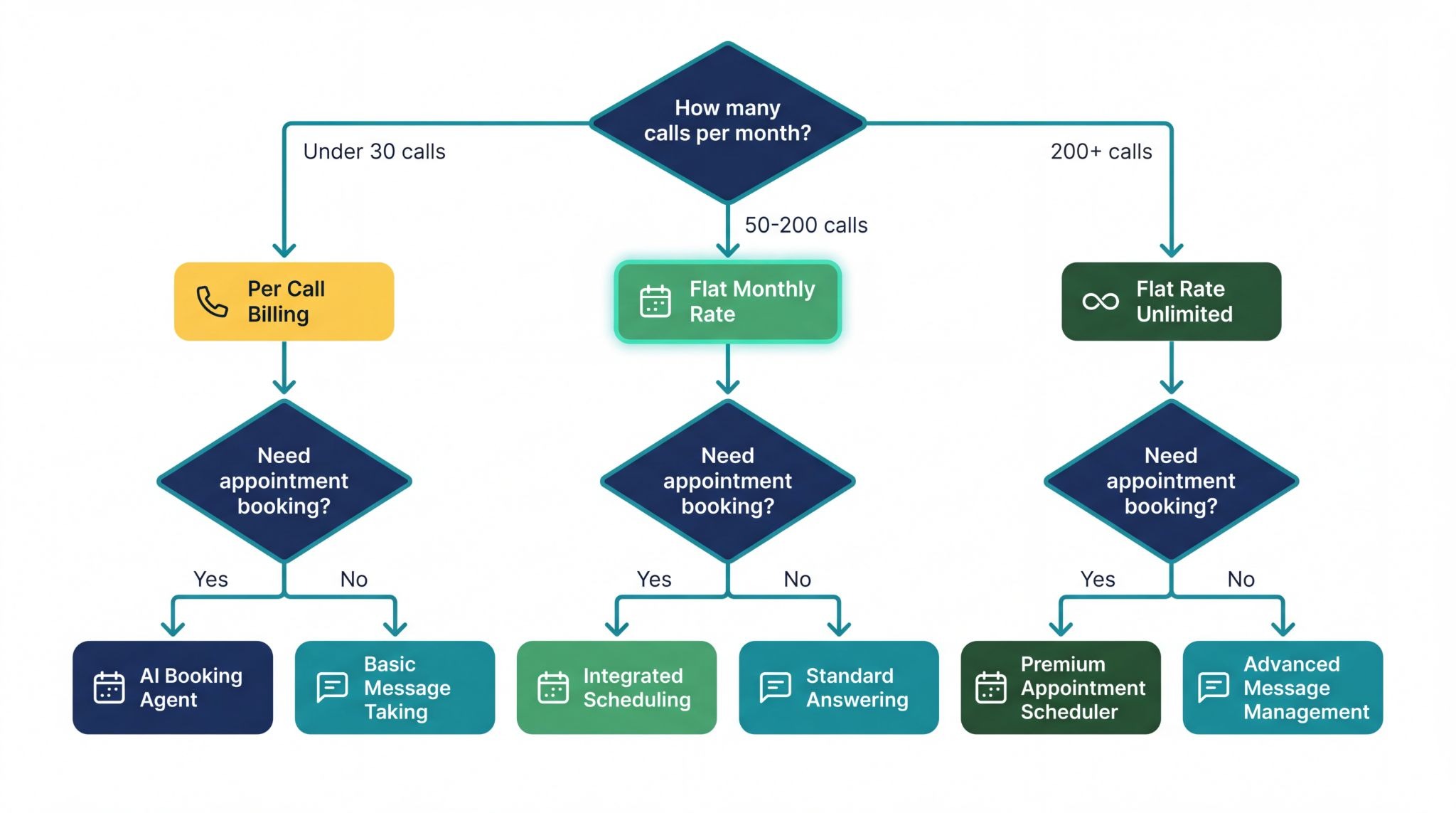
Next Steps: Choosing Your AI Answering Service
Here's your decision framework:
Start with Voicei if:
-
You run a service business (home services, salon, real estate, professional services)
-
You need flat rate pricing under $50/month
-
Appointment booking is critical
-
You want fast setup with no technical complexity
-
You value month to month flexibility
Consider alternatives if:
-
You're an e-commerce store needing order lookup integration
-
You require HIPAA compliance for clinical conversations
-
You need hybrid AI + human backup for high stakes calls
-
You want highly customized call flows
Your action plan:
-
Calculate your current missed call cost (calls missed × booking rate × average job value)
-
Start a free trial with Voicei or your top choice
-
Forward your business number and let it handle real calls for 7 days
-
Review transcripts daily during the trial
-
Measure: answer rate, calls handled correctly, appointments booked
-
Keep it if numbers improve, cancel if they don't
Most businesses see results in week 1:
-
Answer rate jumps from 60% to 95%+
-
Appointments book automatically instead of through phone tag
-
After hours calls get handled instead of going to voicemail
-
Time spent on phone decreases by 5 to 10 hours weekly
Try Voicei free for 7 days. Setup takes 15 minutes. No credit card required. If it doesn't work for your business, cancel before the trial ends.
Get started at voicei.ai or call our AI to see how it works: +1 (515) 884-7850